 Inventors Den
Subscribe !!!
Inventors Den
Subscribe !!!
I Gave Physical Body To My AI Agent!
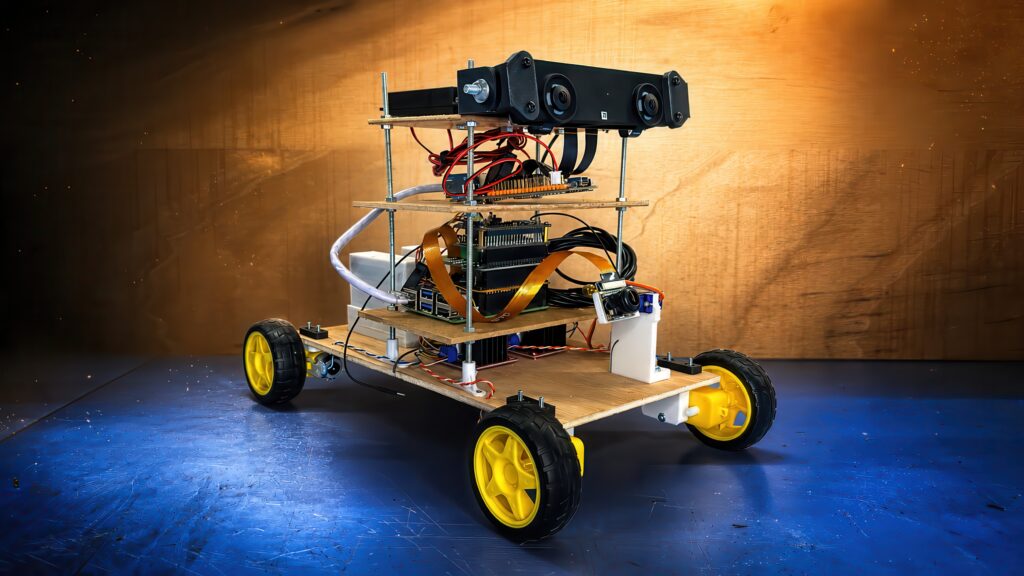
Project overview This project explores what happens when modern AI models are used as the main development partner for building a capable robot. Instead of manually programming every…
Project overview
This project explores what happens when modern AI models are used as the main development partner for building a capable robot. Instead of manually programming every feature from scratch, the build focused on giving AI assistants clear goals and using their guidance to configure hardware, software, audio, computer vision, and ROS communication.
The robot evolved from a simple wheeled platform into a more advanced system with computer vision, audio processing, GPS awareness, stereo cameras, local AI processing, and the ability to search for a person in its environment.
Embedded video
Features
AI-assisted development
ChatGPT and Claude Code helped plan, configure, troubleshoot, and connect the robot’s software and hardware systems.
Computer vision
The RDK X5 and stereo camera system give the robot visual awareness and depth information for understanding its environment.
Audio interaction
The Raspberry Pi audio setup allows the robot to handle voice-related tasks and prepares it for future communication features.
GPS awareness
A USB GPS module adds location awareness while keeping Raspberry Pi GPIO pins available for other upgrades.
ROS communication
The Raspberry Pi and RDK X5 were connected through ROS so the robot could behave like a unified system.
Person search behavior
After the final integration, the robot could orient itself, analyze its surroundings, and actively search for a person.
Specifications
Raspberry Pi
D-Robotics RDK X5
Stereo camera system
Raspberry Pi AI HAT
USB GPS module
ROS connection between Raspberry Pi and RDK X5
The Article
Building an AI Robot Without Programming: How AI Models Took Over the Development Process
What Happens When You Let AI Build the Robot?
For years, building a capable robot required writing thousands of lines of code, configuring countless software packages, and spending hours debugging every small issue. In this project, I wanted to try something completely different. Instead of manually programming every feature myself, I decided to see how far modern AI models could take the robot development process.
The goal was ambitious but simple: build a robot that could see, hear, understand, communicate, and eventually navigate its environment, while relying heavily on AI assistants to figure out the technical details. Rather than acting as a traditional programmer, my role became closer to that of a project manager. I provided the hardware, explained the goals, and used prompts to guide the AI systems. The AI models then helped determine the steps needed to achieve those goals.
What started as a relatively simple wheeled robot quickly evolved into a much more advanced platform equipped with computer vision, audio processing, GPS positioning, and autonomous navigation capabilities. Throughout the project, I discovered that modern AI tools can dramatically accelerate robotics development, but they still require patience, experimentation, and careful troubleshooting.
Overview of the New Components
The first stage of the upgrade began when all the new hardware finally arrived. Compared to the original version of the robot, this upgrade introduced several major components that would significantly expand its capabilities.
The robot received a dedicated AI vision accelerator that would handle image recognition tasks. I also added audio hardware that would allow the robot to listen to commands and potentially communicate through speakers. A GPS module was included to provide location awareness, while several expansion boards were added to improve cable management and future connectivity options.
The most significant addition, however, came in the form of a complete computer vision platform supplied by D-Robotics. This included the RDK X5 board and a stereo camera system. Together, these components would become the robot’s eyes and provide the processing power required for advanced local AI applications.
At this point, the project was no longer about simply moving a robot around a room. The objective was becoming much more interesting: creating a machine capable of understanding its surroundings and interacting with people in a meaningful way.
What Was Added to the Raspberry Pi
The Raspberry Pi remained the central controller of the robot, but it required substantial upgrades to support the new functionality.
One of the first additions was the Raspberry Pi AI HAT. This module was intended to accelerate image recognition tasks and allow visual processing to happen much more efficiently. Because the AI HAT generated heat during operation, I also installed a cooling solution to help maintain stable performance.
Another important addition was a GPIO expansion board. Although it sounds simple, this component played a crucial role in keeping the growing number of cables organized. As more sensors and modules were added, proper cable management became increasingly important. Without it, troubleshooting would quickly become a nightmare.
The GPS module was also integrated into the Raspberry Pi stack. Interestingly, it did not require the traditional GPIO connections that many Raspberry Pi accessories use. Instead, it communicated through a USB connection, simplifying the installation process and leaving expansion pins available for future upgrades.
As the hardware stack continued to grow, the Raspberry Pi began to resemble a layered sandwich of modules. Each board added a new capability, and together they transformed the robot into a much more sophisticated platform.
What the RDK X5 Was Used For and How It Was Installed
While the Raspberry Pi handled many core functions, the RDK X5 was introduced specifically for computer vision and AI processing.
The board immediately stood out because of its extensive connectivity. It featured HDMI output, multiple USB ports, Ethernet connectivity, camera interfaces, and display connections. From a hardware perspective, it looked somewhat similar to a Raspberry Pi, but its purpose within the project was very different.
The accompanying stereo camera system became the robot’s primary visual sensor. Unlike a standard camera, a stereo camera provides additional depth information, allowing the robot to better understand the three-dimensional structure of its environment.
Installing the hardware required careful planning. Initially, I considered mounting some components lower on the chassis, but I quickly realized that a higher position would provide better visibility for the cameras. As a result, I extended the support structure of the robot and created additional mounting platforms.
The redesign also improved accessibility. By relocating various modules and extending the structure vertically, I created enough room to accommodate the new hardware while keeping the system organized and serviceable.
Once installed, the RDK X5 effectively became a dedicated AI vision computer running alongside the Raspberry Pi.
Raspberry Pi with OpenClaw and ChatGPT: Surprisingly Good at Audio Setup
With the hardware in place, the next challenge was software.
I installed OpenClaw on the Raspberry Pi and connected it to ChatGPT. One of the first tasks was configuring the audio system so the robot could listen and respond appropriately.
To my surprise, ChatGPT handled this part extremely well.
Instead of manually searching through documentation, identifying dependencies, and configuring every component myself, I was able to describe the desired outcome and let the AI guide the process. The model provided installation instructions, troubleshooting suggestions, and recommendations for getting the audio hardware operational.
The experience felt very different from traditional development. Rather than spending hours searching forums and experimenting blindly, I could simply explain the problem and receive a structured response.
The audio functionality came together relatively smoothly, giving the robot the ability to process voice-related tasks and laying the groundwork for future interaction capabilities.
At this stage, it was becoming increasingly clear that AI assistants could significantly reduce the barrier to entry for robotics projects.
OpenClaw with Claude Code on the RDK X5 Successfully Configured Computer Vision
The computer vision side of the project was handled differently.
For the RDK X5, I decided to experiment with Claude Code through OpenClaw. The objective was to get the stereo cameras operational and configure the local AI environment needed for object recognition and image analysis.
This turned out to be one of the most impressive moments of the entire build.
The AI was able to understand the desired outcome, identify the required software components, and help establish the computer vision pipeline. The process included configuring the cameras, verifying functionality, and preparing the system for image analysis tasks.
Seeing the stereo cameras begin to function as intended was a major milestone. The robot was no longer blind. It now had the ability to observe its surroundings and gather meaningful visual information.
The combination of local AI processing and stereo vision opened the door to much more advanced behavior than simple remote-controlled movement.
For the first time, the robot was beginning to perceive the world around it.
Claude Code Solved the ROS Connection Better Than ChatGPT
The next major challenge involved connecting the Raspberry Pi and the RDK X5 together.
The overall architecture required the two computers to communicate efficiently. The Raspberry Pi handled many of the robot’s core systems, while the RDK X5 focused primarily on computer vision. To make everything work as a unified system, I needed a reliable ROS connection between the two devices.
Initially, I attempted this using ChatGPT inside OpenClaw.
While the guidance was useful, the process became increasingly complicated as networking, dependencies, and ROS configuration details entered the picture. Progress was slower than expected, and I encountered multiple obstacles along the way.
At that point, I decided to try Claude Code.
The difference was immediately noticeable.
Claude Code appeared to understand the broader system architecture more effectively and provided solutions that were easier to implement. Instead of addressing isolated problems one at a time, it often suggested more complete approaches that considered the overall communication pipeline.
As the troubleshooting continued, Claude Code became the primary tool for solving the ROS integration challenges.
The result was a much smoother path toward establishing communication between the two systems.
Two Hours of Prompting, Troubleshooting, and Finally Success
Despite the power of modern AI tools, the project was not entirely effortless.
The final stage involved approximately two hours of prompting, testing, adjusting configurations, and troubleshooting ROS communication issues. This was not a situation where the AI instantly solved everything with a single command.
Instead, the process resembled a collaborative engineering session.
I would describe a problem, test the proposed solution, report the results, and then receive updated recommendations. Each iteration moved the system closer to the desired outcome.
Eventually, everything began working together.
The Raspberry Pi, the RDK X5, the stereo cameras, and the software stack started communicating correctly. The robot could orient itself, analyze its surroundings, and actively search for a person within its environment.
Watching the robot successfully perform these tasks was incredibly satisfying because it represented the culmination of both hardware engineering and AI-assisted development.
More importantly, it demonstrated something that would have seemed unrealistic only a few years ago: a complex robotics system being developed largely through conversation with AI models.
Conclusion: The Future of Robotics May Be Prompt-Driven
This project changed the way I think about robotics development.
Rather than spending weeks writing code from scratch, I was able to focus on defining objectives and guiding the development process through prompts. The AI models handled much of the technical complexity, helping configure hardware, install software, troubleshoot issues, and connect multiple systems together.
That does not mean programming is dead. Understanding how the hardware works remains extremely important, and troubleshooting still requires critical thinking. However, the role of the developer is clearly evolving.
By the end of this project, the robot had gained vision, audio capabilities, GPS awareness, and the ability to search for people using information gathered from its environment. Perhaps even more interesting was the fact that many of these capabilities were implemented with AI assistance rather than traditional manual development.
If this is what AI-assisted robotics looks like today, I can only imagine what it will look like a few years from now. The future may not belong to people who write every line of code themselves. Instead, it may belong to those who know how to ask the right questions and guide intelligent systems toward the right solutions.
Downloads
Parts list
| Part | Quantity | Notes |
|---|---|---|
| Raspberry Pi | 1 | Main robot controller. |
| Raspberry Pi AI HAT | 1 | Used for accelerated image recognition tasks. |
| AI HAT cooling solution | 1 | Helps maintain stable performance during operation. |
| GPIO expansion board | 1 | Improves cable management and leaves room for future upgrades. |
| USB GPS module | 1 | Adds location awareness without using Raspberry Pi GPIO pins. |
| D-Robotics RDK X5 board | 1 | Dedicated computer vision and AI processing board. |
| Stereo camera system | 1 | Primary visual sensor with depth information. |
| Audio hardware | 1 set | Allows the robot to listen and prepare for voice interaction. |
| Expansion boards and mounting platforms | As needed | Used to organize the growing hardware stack and mount components higher on the chassis. |
Gallery
FAQ
Was the robot really built without traditional programming?
The project relied heavily on AI assistants for planning, configuration, troubleshooting, and integration. Hardware understanding and testing were still important, but much of the development process happened through prompting instead of manually writing every line of code.
Which AI tools helped with the build?
ChatGPT helped with the Raspberry Pi audio setup through OpenClaw, while Claude Code was especially useful for configuring computer vision on the RDK X5 and solving the ROS connection between the two systems.
What was the biggest challenge?
The ROS connection between the Raspberry Pi and RDK X5 required the most iteration. It took about two hours of prompting, testing, adjusting configurations, and troubleshooting before everything worked together.

Comments
Comments are closed for this project.